Overview
Pier AI is the voice of CSOŠE, the Frassati church technical secondary school in Bratislava. Students talk to it in Slovak. It knows facts about the school, tells the time and the bell schedule, reads out the timetable, gives the weather, answers questions from the curriculum and tells jokes. It deliberately refuses to answer what it has no verified answer for.
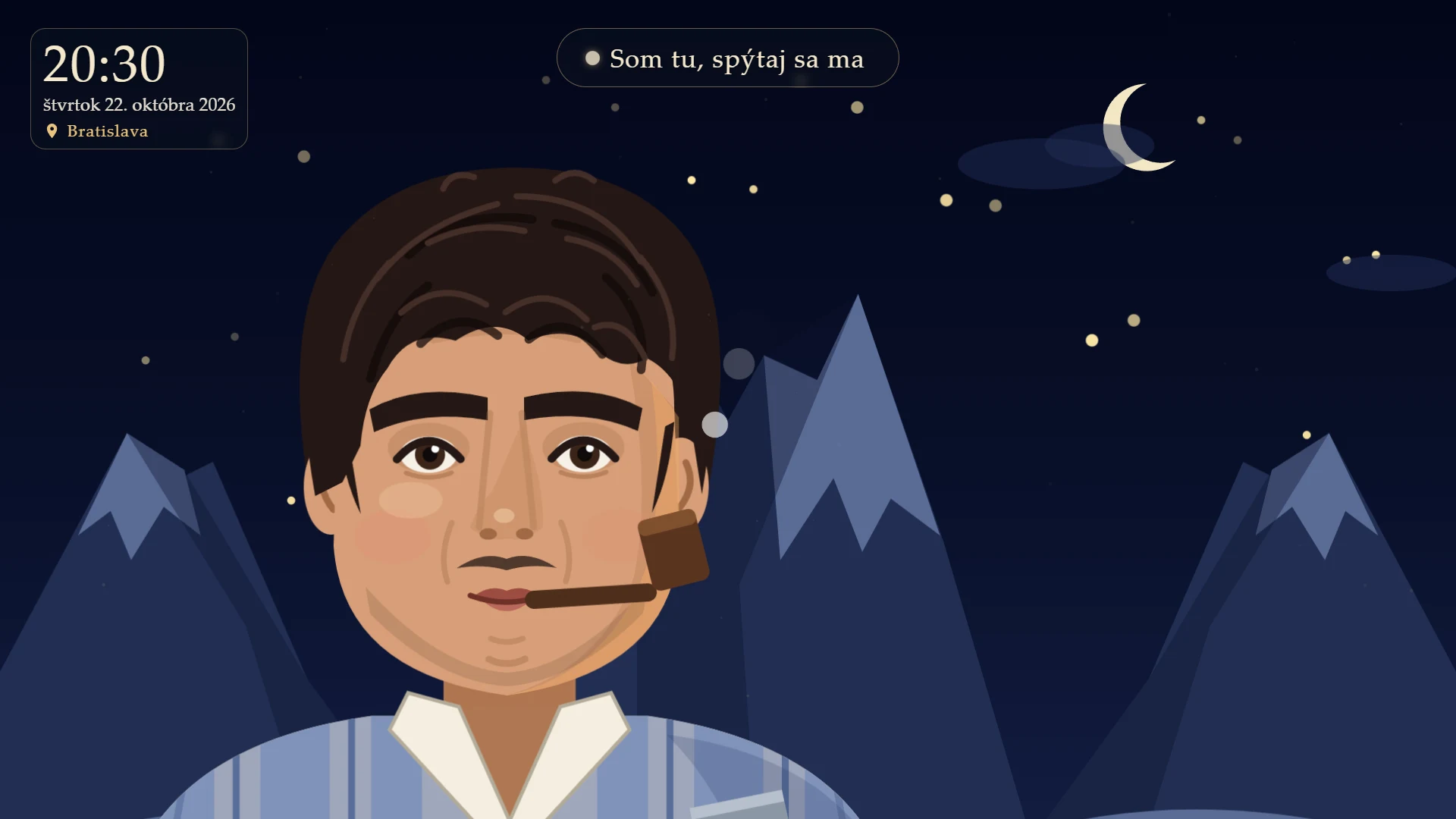
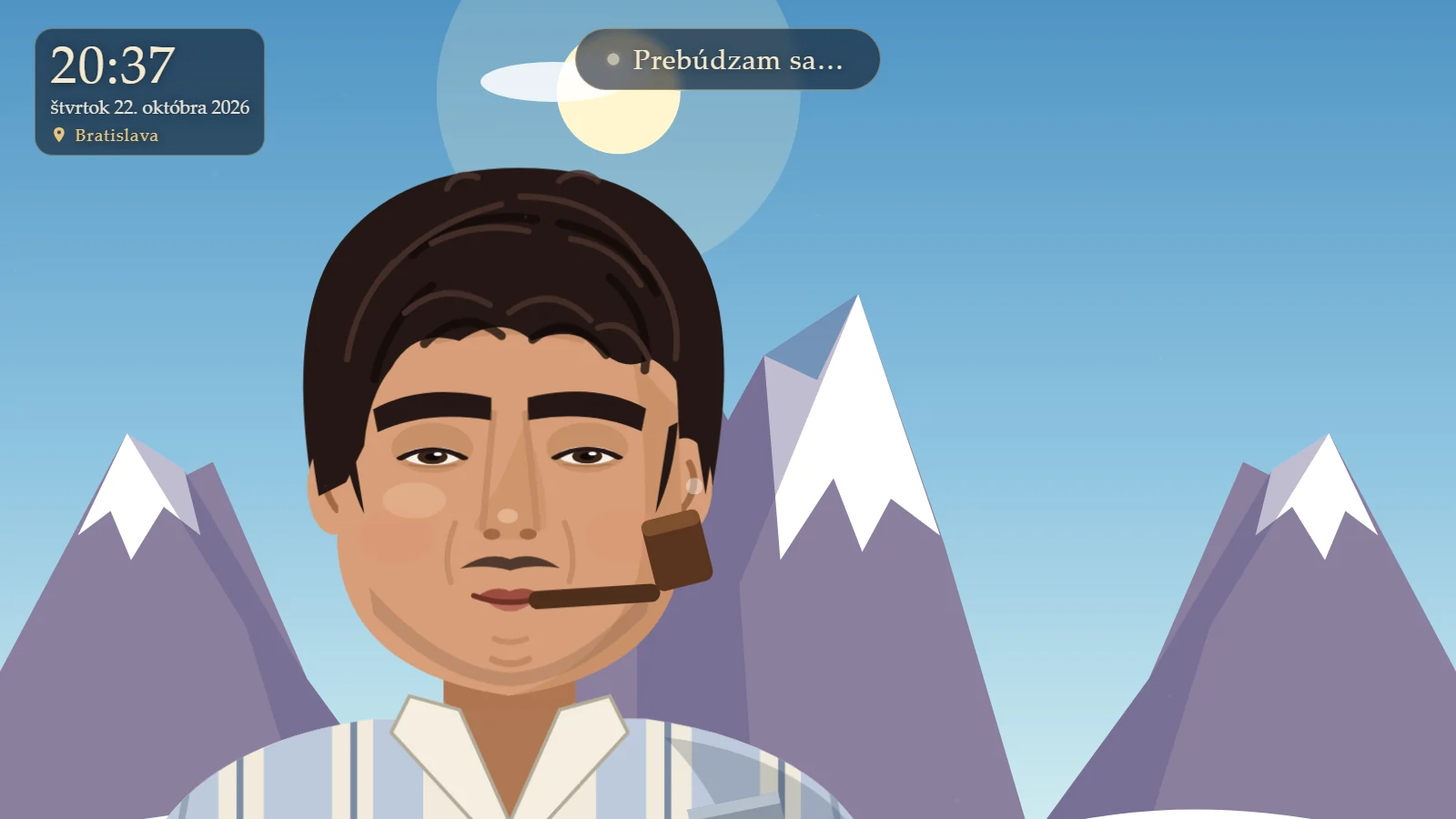
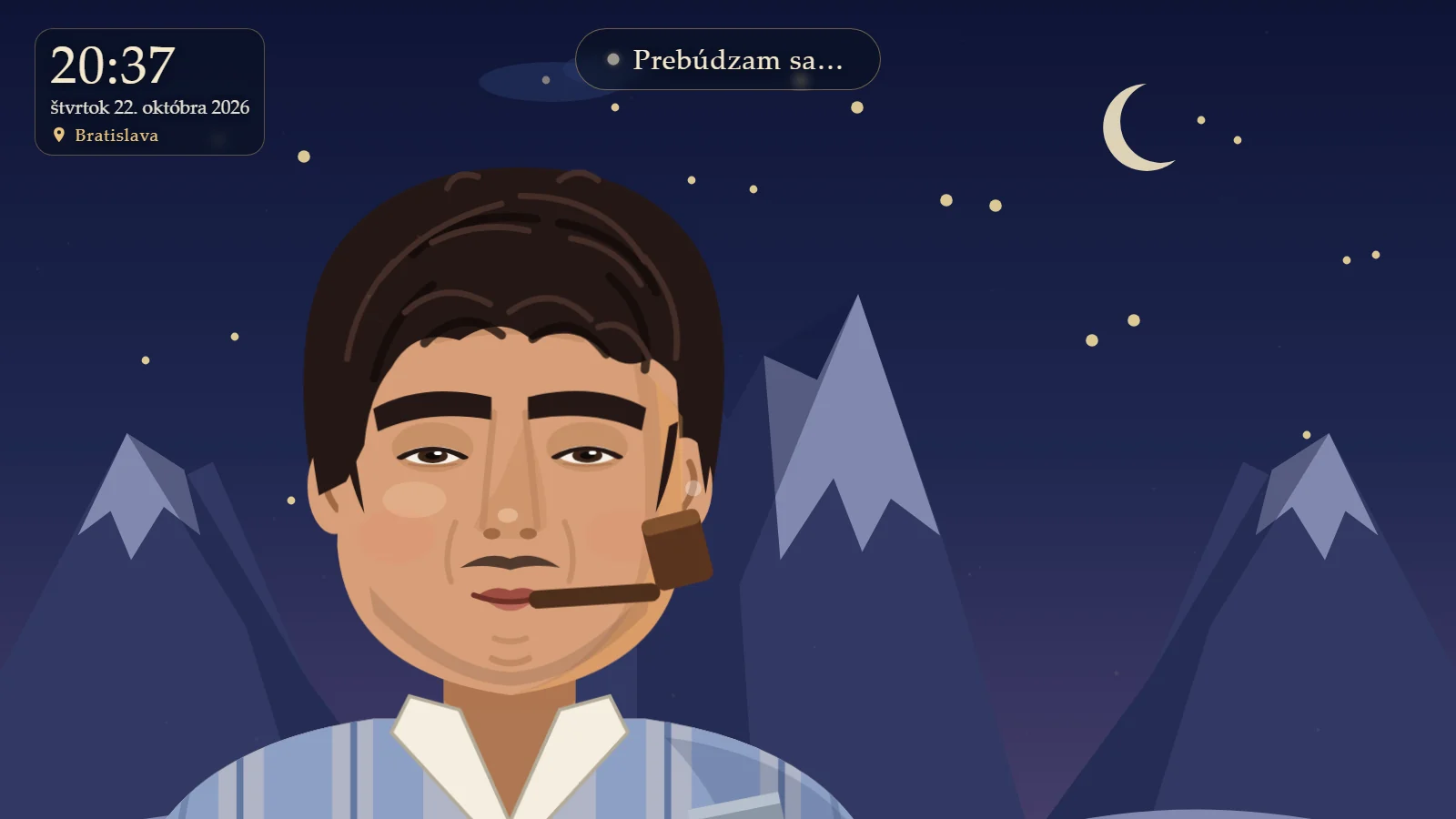
The mascot is the school's patron, Pier Giorgio Frassati, drawn as the mountaineer he was. The sky behind him follows the real Bratislava sun, so the scene changes through the day. On Windows the app is a double-click icon; it opens a window, F or a double-click makes it full screen, and it shuts itself down when the window closes.
| At a glance | Detail |
|---|---|
| Language model | pier-e2b, a fine-tuned and pruned Gemma 4 E2B, Q4_K_M, 1.55 GB (Apache-2.0) |
| Prompt | about 1,000 tokens, plus the 2 closest verified answers |
| Verified answers | 414 hand-written question and answer pairs |
| Quality | 98 of 105 on a test the model never saw; 2.2% unknown words |
| Speed on a simulated Pi | 9 s to read the prompt at start; 1.5 to 3.1 s from the end of a question to the first text |
| Raspberry Pi estimate (not measured) | about 30 s to start, 5 to 10 s per answer, about 4 GB of 8 GB memory |
| Ports | 8765 for the screen (state over SSE), 8008 for the voice service |
| Code | about 730 lines in the main program, plus prompt, retrieval, spell-fix and timetable modules |
The goal and the constraint
The decision I made early was that everything must run on a Raspberry Pi 5 (8 GB) with no PC, so a school could put it on a wall without a gaming machine or a cloud bill. That one constraint shaped every other choice: a small model, CPU speech recognition, and no dependence on paid services.
Today the full version runs on my home PC (RTX 3060) with a male voice. A Raspberry Pi package is prepared, but I have not yet run it on a real Pi, and I say so on purpose. What I have verified is the syntax of the scripts, a simulation of the Pi on a PC without a GPU, and a remote voice.
What happens when you ask a question
- Listen. The microphone is always on. No button is needed; the app detects speech. The detection threshold (
SPEECH_RMS) is tuned for a headset on the PC. - Transcribe. Parakeet-sk (int8, via sherpa-onnx) turns Slovak speech into text on the CPU. Audio is never written to disk.
- Fix names.
fix_namescorrects speech-model mistakes such as "farsati" to Frassati. - Route. In
turn()the question goes through these checks, in this order:clock_answer(time and date),unknown_word_answer("what does the word X mean" when X is not Slovak),unclear_answer(one word that is not a greeting),strict_answer(strict mode), andtimetable.answer(timetable and bells, computed by Python). - Retrieve. Otherwise the two closest verified answers from
data/znalosti.jsonlare found by text similarity (minimum 0.40) and added to the prompt. - Generate. The local language model answers in a sentence or two at temperature 0.3, streaming sentence by sentence (
stream_llm). - Clean up.
spellfix.fixrestores missing diacritics and common small-model mistakes, only when the correction is unambiguous. - Speak. Each sentence goes to the voice service with
POST /speak, which returns a WAV thatsounddeviceplays. - Show. The screen is a web page at
http://localhost:8765; the app streams state changes to it over server-sent events, and the face moves its mouth, eyes and head to match.
Routing and strict mode
Strict mode (PIER_STRICT=1, on by default) is the most important safety decision. The model may answer freely only on topics that were verified: the school, the patron, the weather, jokes, greetings, facts about Pier himself, the rules and places in the building. This is a regular expression, ALLOWED_TOPICS. Anything else gets a fixed answer saying there is no verified answer.
- Why. A small model outside its collection makes things up. Examples from testing: it turned "neštyri" into "the sign for the number three", and a garbled word into confused text.
- The bypass. A question that matches a verified answer with similarity of at least 0.40 is answered even if its topic is not on the list, so adding a verified answer is the way to widen what Pier can do.
- An ordering trap. Strict mode runs before the timetable. So the words students use for timetable and bell questions (hours, breaks, bells, timetable) must be on the allowed list, or those questions get refused before the timetable logic sees them.
- When it is wrong. Strict mode also refuses simple general questions outside the collection ("how many days are in a week?"). The remedy is to add verified answers, not to loosen the model.
- Switching it off.
PIER_STRICT=0, for experiments only.
Components
| Part | What it does |
|---|---|
| Speech recognition | Parakeet-sk int8 through sherpa-onnx, CPU only. About 0.7 GB; about 0.2 s per sentence on the PC, estimated 0.5 to 1 s on a Pi |
| Language model | pier-e2b: a fine-tuned and pruned Gemma 4 E2B in Q4_K_M, 1.55 GB, served by Ollama (version 0.40.6 on the PC) |
| Verified answers | 414 hand-written question and answer pairs, retrieved by similarity (knowledge.py) |
| Voice | OmniVoice (male, needs an NVIDIA GPU) or Piper "lili" (female, runs on CPU, about 60 MB) |
| Spell fix | Rule-based correction (spellfix.py) with the Hunspell sk_SK dictionary |
| Time, bells, timetable, weather | Computed in Python from the clock, the school's EduPage data and Open-Meteo, never guessed by the model |
| Window | A full-screen web page with an SVG character, sky and clock (web/) |
| School facts | Plain text files, data/skola.txt and data/patron.txt, that a teacher could edit |
Two voices, one interface
Both voice services expose the same small API (/health and /speak, port 8008), so the main program does not care which one is running.
| Detail | Piper "lili" | OmniVoice |
|---|---|---|
| Voice | Female | Male |
| Runs on | CPU | NVIDIA GPU with CUDA |
| Licence | MIT | Weights are CC-BY-NC (non-commercial) |
| Sample rate | 22,050 Hz | 24,000 Hz |
| Used on | The Raspberry Pi | The Windows PC |
| Script | tts/piper_server.py | tts/omni_server.py |
On Windows the app starts OmniVoice by itself. If PIER_TTS_URL is set, no local voice is started and the remote one is used instead, which is how a Pi can borrow the PC's male voice over the private network. The sample rate is also a quick way to tell the two apart: I once benchmarked OmniVoice by mistake, thinking it was Piper, because port 8008 was already taken.
Making a small model speak good Slovak
An off-the-shelf small model speaks poor Slovak and invents facts. I trained my own.
- Pruning. The original Gemma 4 E2B has 5.1 billion parameters, of which about 2.75 billion are word tables for every language and 0.45 billion are audio and vision. I removed the audio and vision towers and cut the vocabulary from 262,144 to about 60,000 tokens. The model shrank to 2.5 billion parameters, the quantised file is 1.56 GB instead of 4.6 GB, and picking a word is about 15% less work.
- Fine-tuning. LoRA training on the pruned model with about 1,500 samples: Slovak answer style, length, refusals ("I don't know, ask at the office"), the persona, weather, rules and general curriculum answers. It trains only on the answer. It took about 80 minutes on the RTX 3060 at about 650 words per second.
- Facts are not in the weights. The model learned to read school facts from the prompt, including examples where the line is missing and the correct answer is "I don't know". When a fact changes, someone edits a text file and no retraining is needed. On changed data it scored 5 out of 5.
- Retrieval of verified answers. A 2-billion-parameter model cannot absorb a curriculum from a few hundred answers. So at question time the closest verified answers go into the prompt and the model rephrases them. On 20 brand-new topics it had never seen, it answered 19 correctly.
- Own prompt template. The Modelfile has a custom template identical to the one used in training. It must not be overwritten, and its
FROMline contains a Windows path that the Pi installer rewrites. - No "thinking". For Gemma 4 models Ollama writes the answer into a
thinkingfield by default, so the app sendsreasoning_effort: noneand the evaluation script needs--think-off.
I first used a 12B Slovak model (OpenEuroLLM-Slovak) as a teacher to write general answers, and it invented facts (asked what the word "var" means, it answered "a Slavic calendar"). So every general answer is now written by hand in the answers_*.py files, and the teacher is only used to paraphrase questions.
When batch lengths differ, GPU memory fragments, and on a 12 GB card Windows starts spilling it into normal memory, which is about 3 times slower. Rounding each batch length up to a multiple of 128 in train_lora.py fixed it.
Measured results
All figures come from tests the model never saw in training. Each model got the same prompt and the same questions at temperature 0. The test grew over time (57, 62, 85 and finally 105 questions), so rows measured on different sizes are not directly comparable.
| Model | Correct | Unknown words | Response |
|---|---|---|---|
| gemma3:4b with examples (3.4 GB) | 72 / 85 | 3.9% | 1.7 s |
| Original Gemma 4 E2B with examples (4.6 GB) | 62 / 85 | 5.0% | 1.5 s |
| Original Gemma 4 E2B without examples | 61 / 85 | 4.3% | 1.5 s |
| pier-e2b, round 1 (fine-tuned, pruned, 1.6 GB) | 76 / 85 | 5.3% | 1.3 s |
| pier-e2b, round 2 (plus 287 verified answers) | 79 / 85 | 2.6% | 1.3 s |
| gemma3:4b with examples and verified answers | 78 / 85 | 3.4% | 2.1 s |
| pier-e2b round 3 (continued from round 2, not used) | 77 / 85 | 3.0% | 1.3 s |
| pier-e2b round 2 plus 414 answers (105-question test) | 98 / 105 | 2.5% | 1.3 s |
| pier-e2b deployed (414 answers plus spell fix) | 98 / 105 | 2.2% | 1.3 s |
Inside the 105-question test, the deployed model scores: facts 18 of 20, traps 10 of 10, changed data 5 of 5, general questions 15 of 18, taught topics 23 of 23, new topics without training 19 of 20, rules 3 of 3, weather 3 of 3, persona 2 of 3. The column that matters for a fair comparison is the 62 questions that are new to every model, where gemma3:4b with examples scores 57 (55 once it gets the same verified answers) and pier-e2b scores 56.
With the same help, gemma3:4b and pier-e2b score about the same (78 and 79 out of 85). But pier-e2b is half the size and needs half the prompt, which is what lets it fit on a Raspberry Pi. gemma3:4b is slightly better on general questions outside the list (17 against 15 out of 18).
Experiments and what they decided
| Experiment | Result | Decision |
|---|---|---|
| Quantisation Q4_K_M, Q5_K_M, Q6_K | All 79 of 85. Q5 is 12% and Q6 25% bigger; speed on 4 CPU threads is 25, 23 and 20 words per second | Stay on Q4_K_M |
| Temperature 0, 0.1, 0.3 | 98 to 99 of 105, the same within noise | Stay on 0.3 |
| Round 3 of training with unrelated records in the prompt | 77 against 79 | Not used |
| Verified answers 287 to 414 | No retraining needed; 19 of 20 new topics correct; the old test did not get worse | Keep adding answers, not retraining |
| Spell-fix with dictionary suggestions | Broke names ("Merkur" to "Merku", "Pier" to "Pieta") | Discarded; rules-only version kept |
| Select only relevant school facts per question | Would cut 2 to 3 s on a Pi but needs a short new fine-tune | Not done yet |
Speed and memory
| Measure | Value | Status |
|---|---|---|
| Prompt read at start (PC, CPU, 4 threads, Piper) | 9 s | Measured |
| End of question to first text (same setup) | 1.5 to 3.1 s | Measured |
| Generation speed (PC, 4 threads, Q4_K_M) | 25 words per second | Measured |
| Raspberry Pi 5 versus that setup | 2.5 to 3.5 times slower | Estimate |
| Pi start | about 30 s | Estimate |
| Pi answer | 5 to 10 s | Estimate |
| Pi generation speed | 7 to 9 words per second | Estimate |
| Speech recognition per sentence | about 0.2 s on the PC; 0.5 to 1 s on a Pi | Measured; estimate |
Memory budget on the Pi: the model 1.6 GB, its context about 0.5 GB, Parakeet 0.7 GB, the voice about 0.3 GB and the system about 1 GB, so around 4 GB of the 8 GB. The first start after power-on is slower because the model reads the roughly 1,000-token prompt once, then Ollama remembers it.
The face
The first version used a real photo with a WebGL effect. I replaced it with an illustrated SVG character because the patron is famous as a mountaineer ("Verso l'alto", towards the top) and a cartoon climber fits a school app better than an uncanny photo. The photo version is kept in a backup folder.
- A round medallion with a halo, a pipe and an ice axe, drawn entirely in SVG (
web/avatar.js, about 290 lines). - Head, eyes and mouth are driven by the app's state and the voice level while it speaks (
web/app.js). The hand lifts the pipe away while it thinks and speaks. - The sky and the sun position follow the real time in Bratislava. A
?time=HH:MMparameter previews any hour. - The screen shows a clock card at the top left, a status pill at the top and the speech bubble near the mouth.
- Only public-domain artwork is used. Paintings with a watermark were rejected.
Things the model never guesses
Clocks and timetables are facts, so Python computes them and the model is never asked. The time and date come from the machine clock; bell times and the class timetable come from the school's EduPage data (a 370-line module, timetable.py); weather comes from Open-Meteo for Bratislava, with no key. When speech recognition garbles a class name, the app does not guess a time; it answers with a fixed request to repeat it.
The spell-fix pass is deliberately cautious. It only restores missing diacritics, i versus y, and the Czech o that small models write instead of a, and only when exactly one candidate fits. That cut unknown words from 2.5% to 2.2% without damaging any names.
Project layout
| Path | What it is |
|---|---|
pier_ai.py | The whole program: routing, microphone, language model, voice and HTTP server |
school_prompt.py, knowledge.py, slovak_text.py, spellfix.py, timetable.py | The prompt, verified-answer retrieval, Slovak text preparation for the voice, spell-fix, and the timetable |
data/skola.txt, data/patron.txt | Facts about the school and the patron, as plain editable text |
data/znalosti.jsonl, data/slovnik/ | 414 verified answers, and the Hunspell sk_SK dictionary |
web/ | The screen: app.js, avatar.js, style.css |
tts/ | The two voice services (piper_server.py, omni_server.py) |
pi/ | install.sh, the pier-ai.sh kiosk launcher, autostart.sh, stiahni-hlas.sh, and pripravit-balik.ps1 that builds the bundle on Windows |
train/ | Training and tests, only on my home PC: build_knowledge.py, answers_1..5.py, test_set.py, evaluate.py, VYSLEDKY.md |
PierAI.cs, Pier AI.exe | The Windows launcher that opens the Edge window |
Configuration
Behaviour is controlled by environment variables. On the Pi they live in ~/.config/pier-ai.env.
| Variable | Meaning |
|---|---|
PIER_MODEL | Which Ollama model to use, for example gemma3:4b |
PIER_FEWSHOT | 0 for the fine-tuned model; 1 adds worked examples to the prompt for other models |
PIER_KB | 0 turns the verified answers off |
PIER_STRICT | Strict mode; on by default, 0 turns it off |
PIER_TTS_URL | Use a remote voice service instead of starting a local one |
PIER_VOICE_CHECK | Checks each sentence with the recogniser; switched off on the Pi (0) |
PIER_MIC, PIER_SPEAKER | Microphone and speaker, by number or part of the name (list them with python -m sounddevice) |
Keeping it up to date
The school does not need me or a graphics card to improve it.
- New facts about the school go into
data/skola.txt, which is read from the prompt. The model learned to read facts even when they change, so a new line works immediately. - New verified answers are one line each in
data/znalosti.jsonlin the form below. Write 1 to 2 sentences in standard Slovak with no invented facts. They work immediately without retraining.
{"question": "...", "answer": "..."}One trap: at home I keep the same answers in train/answers_*.py and a build script generates znalosti.jsonl from them, overwriting it. Additions made directly in the school file therefore have to be copied into the answer files, or the next build erases them.
Privacy and licensing decisions
- No transcript and no audio is ever written to disk. The launcher discards output and the voice services print nothing. Logging recognised questions would need the school's agreement first.
- The assistant refuses to reveal its own rules.
- The portrait is public-domain only.
- Licences are tracked honestly: Piper "lili" is MIT, Gemma 4 is Apache-2.0, and the OmniVoice weights are CC-BY-NC, so the male voice needs an assessment from the school's data-protection officer before it is used there.
The Raspberry Pi plan
The target is a Raspberry Pi 5 with 8 GB, active cooling and the original 27 W supply, a microSD card of at least 32 GB (NVMe is better), a USB microphone or headset, a speaker and a monitor, running Raspberry Pi OS 64-bit (Bookworm or newer). The installer downloads packages, Ollama and the voice, so it needs internet; weather and timetable use it permanently.
- On Windows, a script builds a 2.2 GB bundle with the program, the language model, the recogniser and the voice service.
- Copy it to the Pi by USB stick or
scp, then run the installer. It sets up the Python environment, Ollama, the voice, thepier-e2bmodel and a menu icon. - The launcher starts Piper by itself and opens the screen in full-screen Chromium. Closing the window with Alt+F4 also stops the program.
- For a wall display, the autostart script plus automatic login starts it at power-on. I can administer the Pi from a school PC over SSH with keys.
Risks to check first, because it has never run on real hardware
- Whether
sherpa-onnxandpiper-ttshave ARM packages for the Pi's Python version. - Whether Ollama on ARM is new enough to recognise the Gemma 4 architecture (the PC runs 0.40.6).
- The real speed, temperature (
vcgencmd get_throttled) and memory (free -h, about 4 GB expected). - The microphone: the speech threshold is tuned to a PC headset, and devices must be selected with the variables above.
If it turns out too slow
- Shorten the prompt and the answers.
- Lower
num_ctxin the Modelfile. - Put only the relevant school facts into the prompt, which needs a short new fine-tune on the PC.
- A male voice on the Pi is not available yet, because there is no good Slovak male voice that runs without a GPU.
Known issues
- Speech recognition errors can turn into a refusal or into "I did not understand the whole question". I saw this with synthetic questions and it is not always repeatable.
- Strict mode also refuses simple general questions outside the verified set.
- Piper's female voice has softer word starts that the recogniser sometimes mishears ("Veľká" heard as "dvetka"), which is why the sentence check is off on the Pi.
- A single word that is not a greeting gets "say the whole question", and an unknown word in "what does X mean" gets "I do not know it".
- Holidays and school breaks are not in the timetable logic. Weather is fixed to Bratislava.
- Training and the large models exist only on my home PC; at school only the app and the data can be changed.
Engineering pitfalls
- A full disk emptied a file. While testing quantisations the disk filled up and a file was silently truncated. Temporary GGUF and Ollama copies are deleted immediately after each experiment.
- A regular expression that never matched. One with doubled slashes never matched, and an alternation joined with
||was always true. Every new regex is tested on positive and negative examples. - Port 8008 is taken by OmniVoice while the app runs, so Piper has to be tried on another port, for example 8009.
- Windows only.
creationflagsforsubprocess.Popenexists only on Windows (fixed). - Line endings. Shell scripts must have LF endings, which the bundle script enforces. Editing files through scripts also needs care with CRLF and with
\Uin Windows paths inside Python strings.
Roadmap, in priority order
- Run it on the Pi, measure the speed and fix whatever breaks.
- Shorten the prompt or answers if it is slow.
- Add about 200 more verified answers, based on what students actually ask.
- Relax strict mode where it refuses without need, using real questions, without writing recognised questions to disk unless the school agrees.
- Get the OmniVoice licence assessed, with the school's data-protection officer, if the male voice is to be used at school.
- Optionally: a short new fine-tune that selects only the relevant facts for the prompt, and a good male voice for the Pi.
Glossary
| Term | Meaning |
|---|---|
| LLM | Large language model: the program that writes the answers |
| STT / TTS | Speech to text and text to speech |
| Parakeet-sk, sherpa-onnx | The Slovak speech recogniser and the runtime that runs it on a CPU |
| int8 | Numbers stored in 8 bits: smaller and faster, slightly less precise |
| Gemma 4 E2B | The base model from Google (Apache-2.0) |
| Pruning | Cutting parts of a model away: here the audio and vision parts and most of the vocabulary |
| LoRA | A cheap way to fine-tune a model by training small extra matrices |
| Quantisation, Q4_K_M, GGUF | Storing the weights in about 4 bits each in the GGUF file format used by llama.cpp and Ollama |
| Ollama | A program that runs local models behind a simple API |
| Retrieval | Finding the closest verified answers and giving them to the model |
| Strict mode | Refusing questions outside the verified topics instead of improvising |
| SSE | Server-sent events: how the program streams state to the screen |
| Hunspell | An open-source spelling dictionary, here Slovak (sk_SK) |
| EduPage | The school's timetable system the bell and timetable data come from |
What I learned
- A small model plus retrieval plus strict rules beats a bigger model with no guard rails for a school helper.
- Put facts where they can be edited (text files and a retrieval collection), and put style where it must be learned (the weights).
- Rules beat a clever model where the answer is checkable: clocks, timetables, weather and spelling.
- Test every regular expression on both positive and negative examples.
- Disk space and GPU memory are real resources when quantising and training models.
- Be honest about what has and has not been tested. The handover notes list the untested Raspberry Pi risks first.